



LightDark

Speaker CleanerInstant Fix in
2 Minutes

Multiple Solutions|Tremendous Results
User Trusted|Expert Analysis

SpeakerCure is a browser-based acoustic cleaning tool that uses high mechanical force frequencies to eject water or remove dust from your phone.

Problems you can solve

CracklingDust and Debris AccumulationUnpleasant Audio QualityWater DamageBlown Speaker SoundsLow Volume ProblemsBuzzing NoisesGritty DistortionScratching NoisesUnnatural Vibrations

Brand & Device Compatibility

Engineered for maximum versatility, SpeakerCure supports a wide range of hardware, including Android devices and iPhones.

It is equally effective for iPads, tablets, wireless earbuds, smartwatches, and Bluetooth speakers. Keep all your audio accessories clear of dust, debris, and liquid obstructions.

Exposing your mobile device to liquid—such as sinks, pools, or rain—is a common but critical issue that requires immediate acoustic recovery.

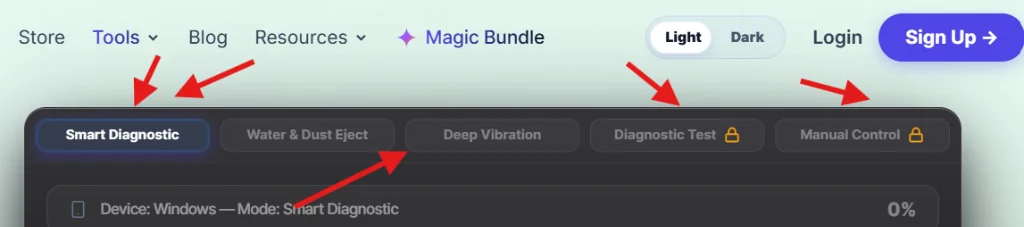
SpeakerCureprovides multiple advanced speaker cleaning solutions and diagnostic modes, whether you're on a mobile phone, tablet, laptop, or other high-tech audio devices. Access smart diagnostics, water eject, dust removal, deep vibration, diagnostic tests, and manual frequency control all in one place.

Smart Diagnostic
Water Eject
Dust Removal
Deep Vibration
Speaker Diagnostic Test
Manual Frequency Control

How It Works

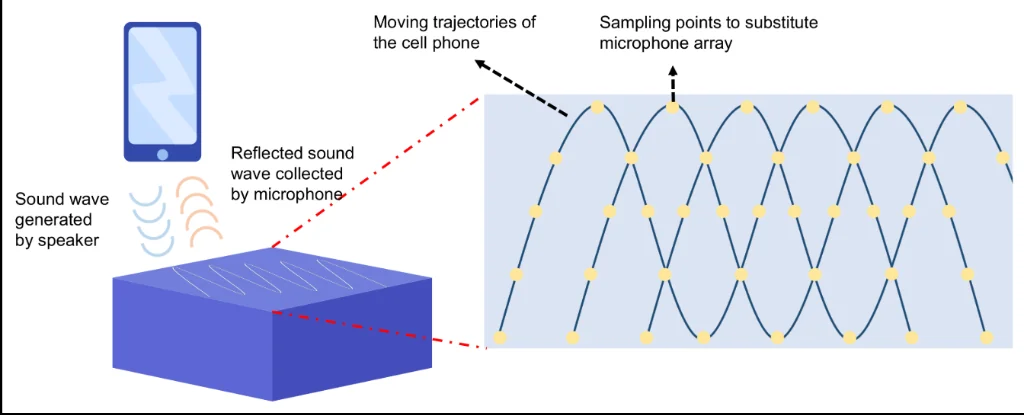
SpeakerCure acoustic cleaning diagram showing frequency sweep process

The speaker cleaning process is straightforward and scientifically proven. Whether you use our website, app, or Chrome extension, you benefit from the same advanced acoustic technology reviewed by speaker repair experts. This precise ejection mechanism is also utilized by Apple in their smartwatches.

Basically, a calibrated sound wave tone ( audio cleaning frequency or vibrations according to the capacity of your speaker chamber) runs from your device, and you will feel its clarity and loudness slowly increasing. But don’t worry, basically for the ejection of dust & water,(💨 💦) every sound tone creates a wave transmission, & this will resonate within the camber, so the dust and water droplets are rapidly pushed outside of the speaker.

If you prevent the water from settling & dying inside the phone’s speaker or dust accumulation, Speakercure is the multi-solution single platform. See full documentation for more technical details.

Why Multi Mode? Tailored Solutions.

Use them in case your speaker is muffled with any kind of debris, dirt, fluid, liquid, saltwater droplets, or dust particles; these shut down your speaker's audio performance & quality.

This quick, controlled sound boosting method is specially optimised with an easy interface and effective functions to fix distorted sound quality or give you better output results.

SpeakerCure tool interface showing Smart Diagnostic, Water Eject, and Dust Removal modes

Use them if you're NOT satisfied with the built-in frequency intensity system.

By following our targeted rules and guidelines, these features give you an 80% solution rate, as already explained in the .

Everything Your Speaker Needs - All in One Place

Most online speaker-cleaning tools just play 165Hz Sound, decorate emojis on buttons, & expect to fix their Speaker. You will never know the real problem, or the difference between a simple sound and a web api based audio cleaning system.

On the other hand, SpeakerCure is a dedicated cleaning platform for this deadly purpose. Just for user satisfaction or pure cleaning purposes, we include our products on every type of device.

Including these Features:

Smart Diagnostic

This mode detects your browser and operating system, initiating a full frequency sweep across the optimal resonant range of 165Hz to 300Hz.

Vibrating near the natural resonant frequency (f₀) of small mobile transducers allows the voice coil and diaphragm to achieve maximum physical movement.

The automated sweep modulates upward, pauses for 500 milliseconds, and then sweeps back down.

This continuous cycle ensures the speaker diaphragm undergoes varying physical displacements, effectively loosening deep-seated dust and moisture.

Water Eject Technology

Causes:

Accidental exposure to liquid — such as dropping a phone into a sink or pool, sweating during workouts, or getting caught in the rain — commonly cause moisture to enter the speaker grille.

While your phone may have an IP67 or IP68 water-resistance rating, these are laboratory test standards rather than permanent guarantees. Protective rubber gaskets and seals naturally degrade over time due to heat, wear, and exposure, allowing moisture to seep into the speaker chamber (especially through the SIM card tray) and cause muffled or distorted sound.

Solution:

Water eject mode sends out a rapid pulse of 190Hz to 210Hz; these short sharp pulses directly vibrate the speaker membrane. This vibration force breaks the water's surface tension, clearing liquid from the mesh openings.

This emulates the same acoustic principle utilized by the Apple Watch for its native water lock and ejection feature.

Unlike native features, SpeakerCure works across all web-enabled devices directly from the browser without requiring any software downloads.

Old hacks like putting your phone in a rice bowl are ineffective. iFixit's research found that rice cannot remove moisture from speaker chambers, and starch particles may cause further damage.

Dust Removal Mode

Causes:

Pocket lint, fabric fibers, and environmental dust naturally collect inside the speaker grille over time.

Over months of regular use, a fine layer of debris accumulates on the mesh, causing muffled sound or reduced volume that might not be visible to the eye.

Avoid using needles or toothpicks to clean the grille, as they can puncture the delicate speaker membrane. Compressed air is also hazardous, as high pressure can push debris deeper inside.

Neglecting this buildup can lead to permanent volume degradation.

Solution:

While standard frequency sweeps work well for liquids, they are less effective against dry dust accumulation.

Our Dust Removal Mode plays a 260Hz tone modulated by a 4Hz tremolo effect, creating dynamic air pressure pulses that dislodge fine dust particles from the grille mesh.

Deep Vibration Cleaning

Causes:

If running standard cleaning cycles multiple times does not improve audio quality, the blockage may be located deeper inside the acoustic chamber. Exposure to water can leave behind dry mineral deposits (like calcium and magnesium) on the internal diaphragm.

Solution:

After selecting Deep Vibration Cleaning Mode, a wave of 165Hz vibrates the speaker diaphragm with high mechanical force. Together, high-gain bursts (500 milliseconds on, 200 milliseconds off) push the diaphragm to its maximum safe excursion (Xmax), without damaging the voice coil.

The Result:

This mechanical agitation dislodges stubborn internal blockages that normal pitch sweeps cannot clear.

Dr.Cure AI Assistant

Dr.Cure AI is an intelligent diagnostic assistant that sets SpeakerCure apart from generic online utilities.

Using modern conversational intelligence, it provides personalized troubleshooting guidance based on your device's specific symptoms.

Dr.Cure AI analyzes your description of the issue to recommend the optimal frequency sweep sequence.

Why is this assistant essential?

Rather than leaving you to guess which frequencies to play, the AI analyzes user input to map out a customized recovery plan.

Whether you have water ingress, pocket lint buildup, or general audio muffling, Dr.Cure AI directs you to the precise fix.

Simply sign in and describe your speaker's condition to get instant support. Unlimited access is included in the Pro plan.

It can also help determine if a software-based cleaning cycle is sufficient or if your device requires physical repair.

This specialized assistant is trained exclusively on speaker dynamics and acoustic recovery.

Real-Time Frequency Visualizer

Visual Audio Feedback:

The primary limitation of third-party speaker cleaning tools is the lack of visual feedback. SpeakerCure addresses this with a real-time, canvas-based frequency visualizer powered by the Web Audio API's AnalyserNode. It captures the acoustic output and displays it across 64 dynamic frequency bars, providing instant visual confirmation of the cleaning process.

The height of each bar represents the amplitude of the active frequency. This is not a simulated animation, but a real-time visualization of the audio wave output generated by your device speaker.

1,200+ Devices Supported

SpeakerCure features automatic device and browser detection, dynamically optimizing the acoustic cleaning parameters for your specific hardware.

This includes broad compatibility with smartphones, tablets, laptops, wireless earbuds (such as AirPods), and external Bluetooth speakers.

Because our core engine is built directly on the native Web Audio API, it runs efficiently in any modern browser without external plugins or installations.

Manual Frequency Control

Acoustic Customization:

Unlike basic tools that offer a single fixed frequency, SpeakerCure provides a comprehensive 20 Hz to 20,000 Hz manual control sweep. Users can select from multiple waveforms—including sine, square, sawtooth, and triangle waves—to target specific types of debris.

A live frequency visualizer provides immediate feedback, allowing audio professionals and advanced users to manually test speaker responses.

Diagnostic Test

Audio Transparency:

While a speaker may sound normal during everyday use, it can lose frequency response or become distorted at specific ranges due to structural wear or debris.

The SpeakerCure Diagnostic Test plays stepped frequencies from 100Hz to 8,000Hz (2 seconds per frequency) and records the live frequency response.

This allows users to pinpoint exact acoustic anomalies, bringing professional-grade diagnostic capabilities directly to any web browser.

Works Offline (PWA)

Imagine water enters your device's speaker when you have no cellular signal or internet connection. How would you protect your device?

Most standard web tools require active internet connectivity to load and function, leaving you vulnerable in remote areas or emergency situations.

SpeakerCure addresses this by operating as a Progressive Web App (PWA). Once installed, our advanced acoustic engine is cached locally on your device.

This ensures that even in areas with poor or no signal, SpeakerCure works flawlessly offline, eliminating network latency and ensuring stable frequency playback.

The PWA is lightweight and easy to install directly from your browser, placing a direct shortcut on your home screen without requiring app store downloads. Available exclusively with our Pro plan.

✦ Essential Knowledge

Before starting an acoustic cleaning session, these are the standard practices people use to save their water-damaged devices.

The popular ways
to clean

01

Shut Down Immediately

02

Silica Gel Absorption

03

Dislodge Water

04

Drying Time

05

Vacuum Technique

06

Functionality Check

07

Sound Vibration Method

08

Professional Assistance

09

Smart Diagnostic

10

Water Eject

11

Dust Removal

12

Deep Vibration

13

Diagnostic Test

14

Manual Control

Traditional vs Digital

A comprehensive breakdown showing effectiveness, speed, and safety of modern acoustic techniques versus outdated tricks.

SpeakerCureDigital Method
Free
Effectiveness
Very High
Time2–3 minutes
Risk
No Risk
Rice MethodPassive Method
Very low
Effectiveness
Low
Time24–48 hours
Risk
Dust residue risk
Hair DryerHeat Method
Low
Effectiveness
Low
Time10–15 minutes
Risk
Heat damage risk
Silica GelAbsorption
Medium
Effectiveness
Medium
Time12–24 hours
Risk
Slow process
Compressed AirPhysical Force
Low
Effectiveness
Medium
Time5 minutes
Risk
May push debris deeper
Professional RepairHardware Service
Very high
Effectiveness
Very High
Time1–3 days
Risk
Safe

MythsvsFacts

Don't ruin your device with dangerous hacks. Learn the truth behind popular speaker fixing rumors.

Myths

Putting your device into a rice bowl and waiting for the rice to absorb the water.

Hair dryer & radiator to dry fast, but heat can melt internal components

Playing Loud music instead of a precisely engineered vibration-patterned, cleaning tool like speakercure.

Facts

Silica gel packets are especially designed for absorbing moisture & effective than the rice trick.

Immediately turning off your device prevents short circuits.

The truth is, these speaker fixing tools are good, but in serious cases, you should call a professional help.

Safety MeasuresinMethods

Critical recovery guidelines for your device.

01.

Immediately shut down the wet device to avoid electrical shorts.

02.

Avoid heat sources, dry the exterior, silica gel, & wait before powering up again.

03.

Dislodge water by lightly shaking the device; this helps droplets come out thru the grills. Use a soft observant cloth to gently pat the device.

04.

Use the Vacuum Technique, use its nozzle to eject the water thru opening, but prevent the nozzle from getting too close to the speaker’s delicate parts.

Sonic Recovery System

Sonic Pulses +
Frequency Sweeps,
perfectly in sync

Go from muffled audio to factory-crisp clarity in minutes. The SpeakerCure platform combines high-intensity sonic pulses, resonance-tuned vibrations, and moisture-displacing frequency sweeps into a single, cohesive recovery system that evolves with your device.

— Everything You Need to Know —

Prevalence of Water and Dust

Daily smartphone use exposes devices to sweat, rain, moisture, and fine dust. When these elements enter the small openings in the speaker mesh, they can cause crackling, reduced treble, and inconsistent volume.

This exposure can degrade the device's water-resistance ratings over time, as lingering liquid accumulates around the speaker ports and within the acoustic cavity.

Common sources of exposure include pocket lint, steam from showers, swimming pool splashes, beach humidity, and intense workouts.

Rattling noises, buzzes, dull high frequencies, and low overall volume are typical symptoms. Neglecting cleanup can lead to permanent hardware damage or accelerated corrosion.

Limitations of Traditional Drying Methods

Common household solutions, including hair dryers and the rice method, rarely address the root cause of speaker muffling. Lodged moisture inside the speaker diaphragm cannot be absorbed by rice; in fact, this method can introduce starchy dust particles into the device ports. Similarly, using a hair dryer can warp delicate internal components or push liquid deeper into the device.

Rise of Digital Cleaning Technology

Digital cleaning technology operates by generating calibrated acoustic waves that cause micro-movements in the speaker membrane. Cycling between low and high frequencies breaks the surface tension of trapped moisture and safely dislodges micro-dust particles without affecting the device hardware.


Usage Guide


Here are the simple steps to follow:

Select your Cleaning mode

No matter which cleaning tab you choose to use, the system automatically detects your device first and recommends increasing the volume to the maximum level if necessary, ensuring a safe and optimal cleaning experience.

Repeat the cycle 2 to 3 times if needed, and try other cleaning tabs to ensure all residual moisture is cleared, as lingering liquid can cause long-term hardware corrosion.

Manual Frequency Control Guide:

Hz (vibration speed)

  • Low frequency (200–400 Hz) → heavy vibration.
  • Medium (400–800 Hz) → normal cleaning.
  • High (800–2000 Hz) → stubborn dust cleaning.

Gain (%)

  • 30–40% → soft vibration.
  • 60–70% → normal cleaning.
  • 80–100% → strong vibration.

Waveform — Sound-wave shape

  • Sine: Emits a smooth, balanced vibration pattern for safe, standard cleaning.
  • Square: Delivers powerful, sharp vibrations optimized for strong water ejection.
  • Sawtooth: Provides continuous, aggressive vibrations ideal for dislodging stubborn dust.
  • Triangle: Generates a moderate, balanced vibration for general-purpose cleaning.
Questions & Answers

Got Questions? We've got answers.

Everythingyou need to know about how SpeakerCure works, billing, and device safety.

To reset speaker sound after water exposure or dust accumulation, run SpeakerCure's frequency sweeps. This clears physically trapped blockages from the speaker membrane. You can also restart your device or reset audio settings if it is a temporary software glitch.
Yes, speaker cleaner sounds are real and scientifically designed. They use specific low-frequency acoustic sweeps (typically between 165Hz and 300Hz) that force the speaker membrane to vibrate rapidly. This vibration generates sound pressure that physically pushes out trapped water and dust.
You can check your phone sound using SpeakerCure's Speaker Diagnostic Test mode. This plays stepped frequencies from 100Hz up to 8kHz, allowing you to easily detect distortion, muffling, or missing frequencies in both your earpiece and main speaker.
You can fix and clean your speaker sound by running SpeakerCure's online frequency waves. If the speaker sounds muffled due to dirt, brush the grille gently with a soft toothbrush first, then run the Dust Removal or Water Eject sound cleaning cycles.
Yes, SpeakerCure is entirely safe for your device. It plays standard sound waves within the normal frequency range (100Hz - 250Hz) and safe volume limits designed by the manufacturer, meaning it won't cause any physical strain or damage to your speaker hardware.

Questions? Visit our FAQ page or contact us.